Field service CRM features

Every feature a service business needs. All included.

NexusCRM is a field service CRM that runs the full quote-to-cash loop — lead capture, AI-drafted quotes, online e-signature acceptance, automatic invoicing, crew scheduling, live per-job costing, payroll, and commissions — with a permission-aware AI assistant built into every step. Every feature is included at one flat CAD price, with unlimited users, on a private instance for each client.

10
modules, one system
~73
AI assistant tools
users included
$0
per-user fees, ever

Updated August 2026 · Feature inventory verified against the shipping product

FORGED IN THE FIELD — every feature on this page exists because a real GTA contracting business needed it in daily operations. Nothing below is a mockup or a roadmap promise; roadmap items are labelled honestly in their own section.

Real screens, real numbers

What does NexusCRM look like?

Screenshots from a running NexusCRM instance — not concept art. Dark, fast, and built to be read from a truck at 7 a.m.
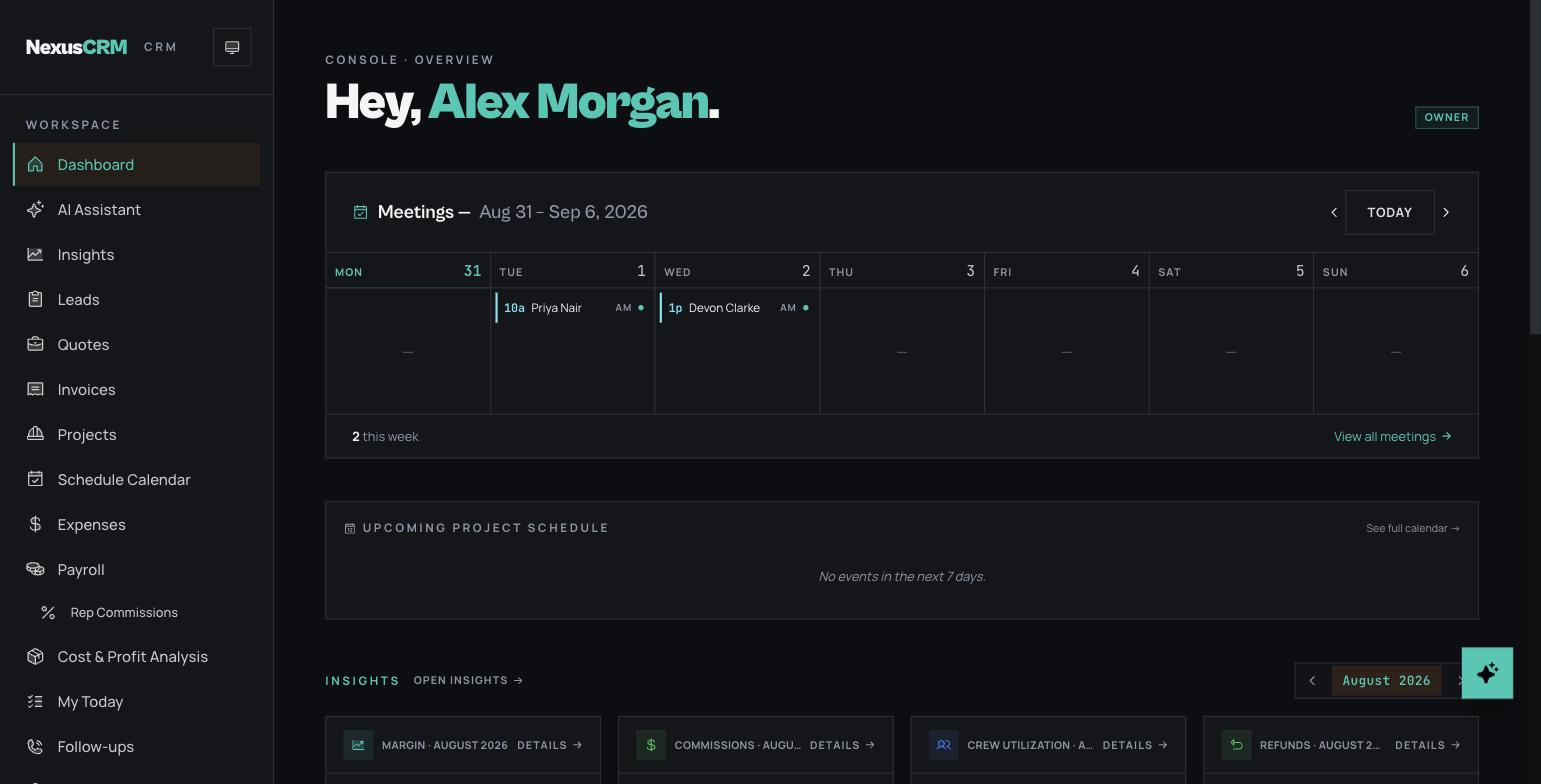
nexuscrm · dashboard
NexusCRM dashboard overview with weekly meetings strip, upcoming project schedule and monthly insights

The owner's morning view: this week's meetings, the project schedule, and month-to-date insights.
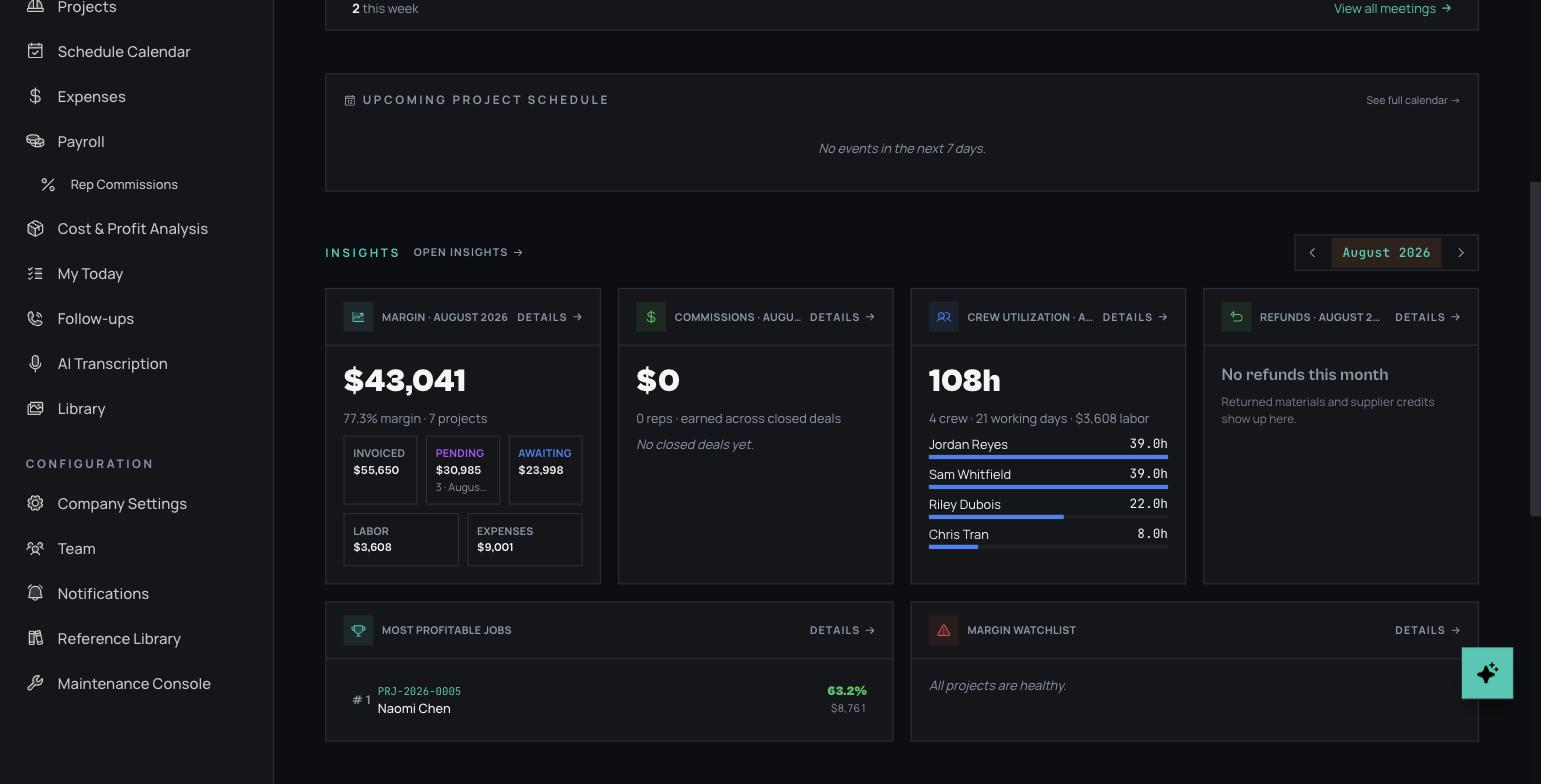
nexuscrm · job economics
NexusCRM insights cards showing live margin, invoiced, pending and awaiting totals, labour and expense costs and crew utilization

Live margin and crew utilization — the P&L updates as the work happens.
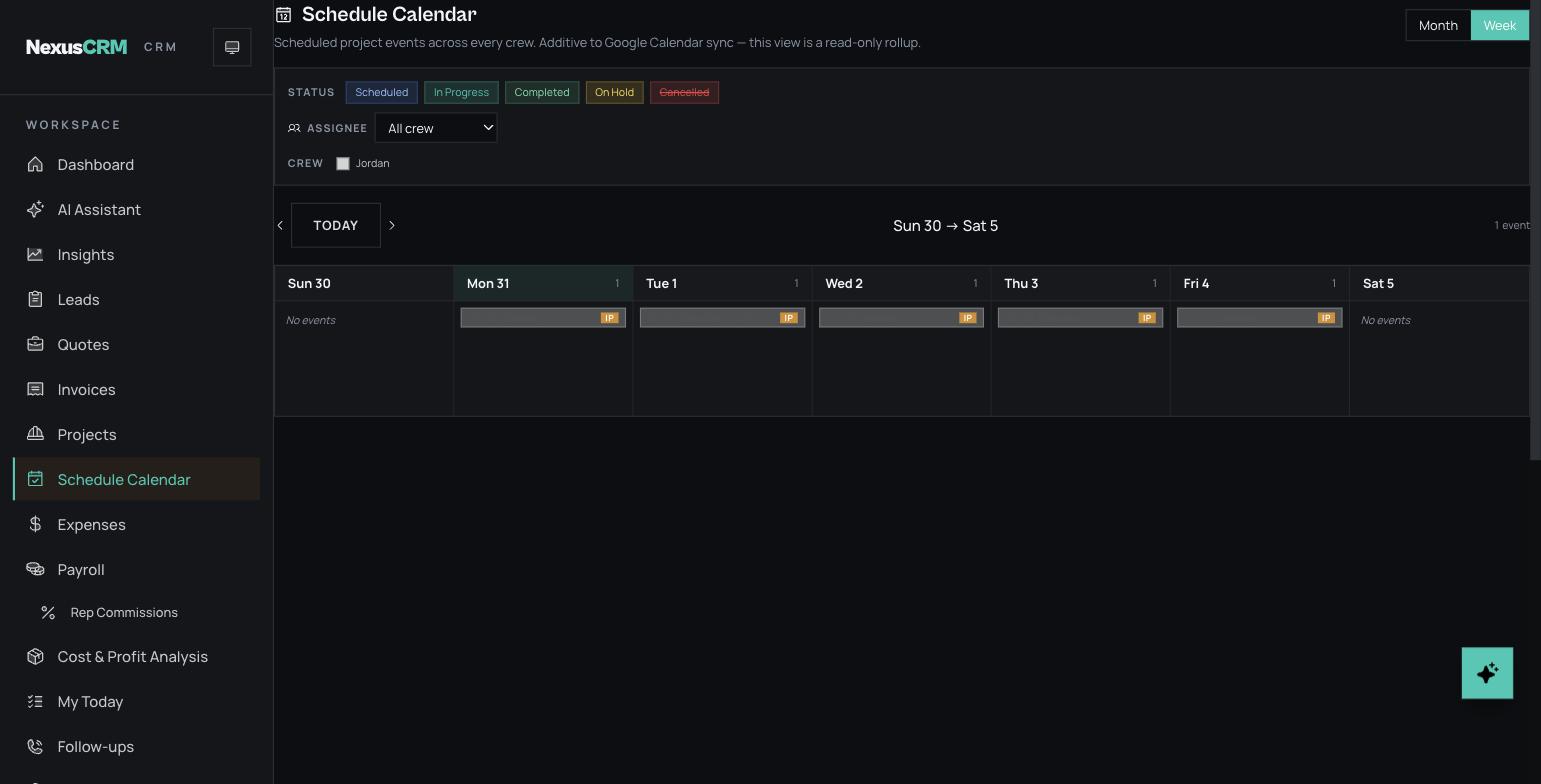
nexuscrm · schedule week view
NexusCRM schedule calendar week view with project events per day, status filters and crew filter, synced to Google Calendar

The dispatch week: every crew's project events, filterable, synced to Google Calendar.
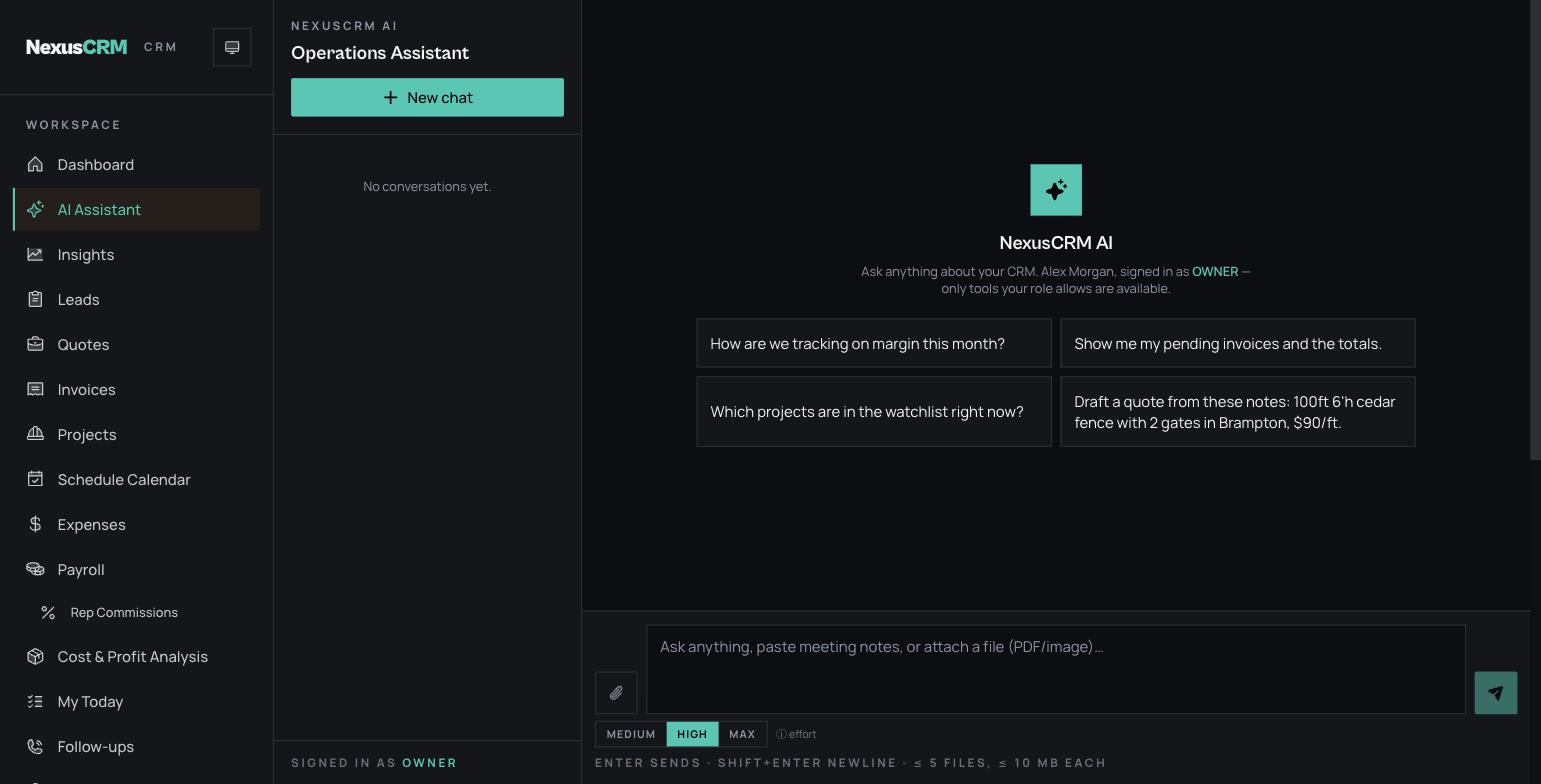
nexuscrm · ai assistant
NexusCRM AI assistant start screen with example prompts for margin tracking, pending invoices, project watchlist and drafting a quote from notes

The AI assistant — ask about margin, or hand it your site notes and get a draft quote.
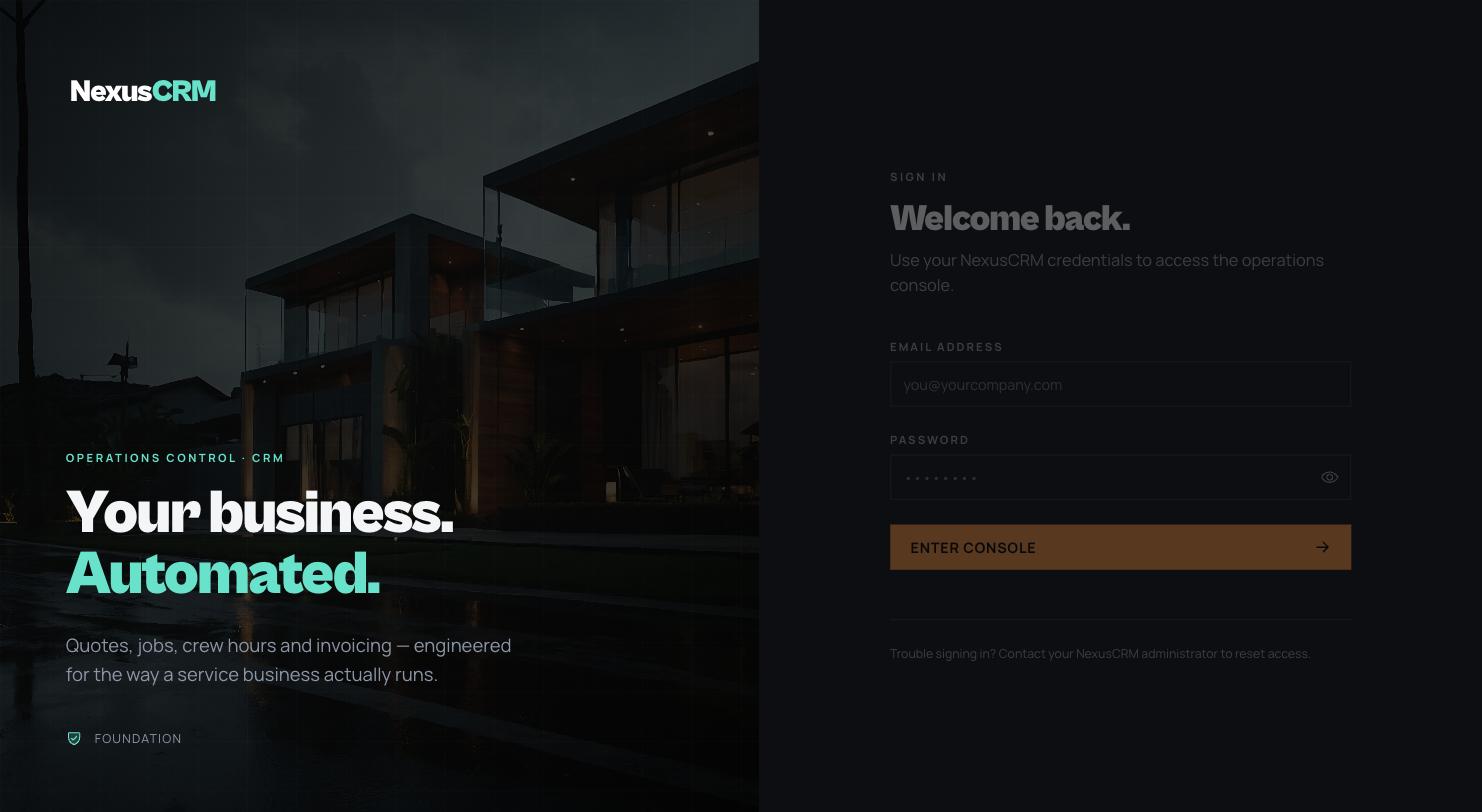
nexuscrm · sign in
NexusCRM sign-in screen with the tagline Your business Automated

Your team's front door — branded to your company on every client deployment.

The deep dive

What features does NexusCRM include?

Ten modules covering the entire operating loop of a service business — every item below ships in the product today. Compare tiers on the pricing page or see how it stacks up against Jobber and ServiceTitan on the comparison page.

Leads & PipelineCapture → follow-up → won
  • Automatic lead capture — Meta Lead Ads, Google, website forms, Zapier and n8n flow straight into your pipeline in seconds, zero copy-paste
  • Duplicate-proof intake — idempotency keys mean a flaky automation can retry all day and you still get exactly one lead
  • Intake log viewer — when a lead "didn't come through," see exactly what the ad platform sent and why
  • Smart service detection — leads arrive pre-tagged with what the customer actually wants
  • Rich lead list — filter by status, source, rep, or follow-up bucket; free-text search across name, phone, email, address
  • Self-updating pipeline — sending a quote bumps the lead to Quoted, acceptance flips it to Approved; stages never rewind by accident
  • Follow-up command centre — Overdue / Today / This-week buckets with one-tap outcomes; your morning call list builds itself
  • "You forgot this lead" nudges — the system emails the assigned rep (and owners) up to three reminders, so you don't have to chase your salespeople
  • Pause until spring — park "call me in April" leads with a reason; bulk sends skip them automatically
  • Activity timeline — every status change, follow-up, email, and quote event in one scroll
  • Bulk actions & CSV export — with full ad attribution (campaign, form, and ad IDs) for ROI analysis
  • Source conversion analytics — lead-to-quote and quote-to-won rates per source, so you know which ads actually pay
Quotes & E-AcceptanceMulti-option → signed
  • Multi-option quote builder — Good / Better / Best options with line items, auto-totals, and per-option tax type
  • Discounts with correct tax math — flat or percent, before or after tax, server-verified; run a promo without ever mis-charging HST
  • Warranty library — 31 editable warranty templates, snapshot-copied onto each quote so later edits never alter sent documents
  • Payment schedule milestones — reusable deposit / mid / completion templates, carried quote-to-invoice automatically
  • Branded PDF generation — spec-grade documents with your branding; editing a customer-visible field auto-invalidates stale PDFs
  • Photo & document attachments — media renders as a PDF appendix and a gallery on the customer web view
  • One-click emailing with tracking — opens and clicks tracked; sender shows "Rep via Company" with replies routed to the rep
  • Public e-acceptance link — no login; customers pick options and approve with a typed signature; immutable snapshots record IP and timestamp
  • Multi-option acceptance — customers tick the options they want with a live running total; billing charges exactly what was accepted
  • Automatic quote expiry — customer reminders at T-3 days and day-of, then auto-expire; quotes create their own urgency
  • Bulk send & promo campaigns — a "sign this week and save 10%" blitz across selected quotes in minutes, with auto-expiring discounts
  • Quote duplication — clone with lineage tracking; signatures and acceptances reset safely
Invoicing & MoneySigned → paid
  • Automatic quote-to-invoice conversion — the moment a customer signs, the invoice and the job already exist; partial acceptances bill from accepted snapshots
  • Standalone invoices — the same options, discount, warranty, and schedule machinery without a quote
  • Computed receivables status — payments drive Pending → Partial → Paid automatically; overpayment is blocked; paid invoices lock
  • Paid-in-full ripple effects — final payment flips the quote to Paid, emails the customer a receipt, and recomputes job revenue
  • Immutable PDF version history — always reproduce the exact invoice the customer was sent, with an audit entry summarizing line changes
  • Receivables aging — 0-30 / 31-60 / 61-90 / 90+ buckets that match the dashboard row-for-row
  • Edit-conflict protection — a teammate's simultaneous change produces a friendly conflict, never a silent overwrite
  • Per-job expense tracking — 10 categories, receipt uploads, CSV export; labour auto-computed from crew hours with no double counting
  • HST-native money handling — 13% HST / 5% GST / tax-free per option, recoverable-HST tracking, one canonical totals engine everywhere
  • Sequential references — INV-2026-0042 plus human display titles ("Carmen fence") that search understands
  • Rep attribution everywhere — auto-stamped and inherited on conversion; feeds commissions with zero manual bookkeeping
  • Signed outbound webhooks — quote accepted, converted, emailed; lead approved or lost — retried, logged, and Zapier/n8n-ready
Projects & SchedulingBooked → done
  • Automatic job creation — every invoice spawns a project pre-filled with client, line items, value, and rep; nothing sold falls through the cracks
  • Guided job lifecycle — Awaiting Schedule → Scheduled → In Progress → On Hold → Completed, with required hold and cancel reasons
  • Kanban, list, and mobile views — five-column board, sortable table, and a phone card stream that reads like a route sheet
  • Multi-visit scheduling — Wednesday tear-out plus Friday install as separate visits, with a full schedule history of who booked what
  • Edit a visit in place — re-time the current visit without duplicate calendar events; the same Google event is patched
  • Crew schedule calendar — month and week views coloured by crew lead, multi-day spans ("day 2/3"), shareable filtered URLs
  • Google Calendar sync (multi-account) — every change pushed within about 60 seconds by a background worker with retries and health checks
  • 24-colour calendar coding — pixel-perfect colour parity between the in-app calendar and Google Calendar
  • Rich calendar events — job number, address title, customer name, and a tappable phone number; crews get everything inside the event
  • Meeting & appointment booking — site walks, calls, and video with invites, reschedule chains, and no-show tracking
  • Booking-driven auto-scheduling — a booking tied to a project drives the project's start date and status automatically
  • Automatic customer status emails — scheduled, rescheduled, started, completed; forward-progress-only so reopening never re-fires "completed"
  • Cancel-safe invoicing — cancelling a job voids unpaid invoices (never paid ones); un-cancelling offers one-click restore
Field OperationsTrucks, crews, hours
  • Crew roster with locked pay snapshots — each assignment freezes pay terms, so historical job costs never silently change as rates do
  • Task management — To-do / In Progress / Blocked (reason required) / Done, with crew assignments, estimates, and due dates
  • Hours tracking with smart time math — start/end or totals, overnight shifts handled, backdating capped, every edit audit-logged
  • One-tap crew-wide shift logging — log the same shift for up to 50 workers with per-worker overrides
  • Day-before crew reminders — automatic 6 PM evening-before emails plus added/removed notifications, duplicate-suppressed
  • Job photos & videos — Before / In Progress / After tagging, HEIC conversion, video posters; crews limited to their own jobs
  • Rep "Today" mobile app — installable PWA with tap-to-call, tap-to-navigate, notes preview, and a one-tap voice recorder
  • Crew "Today" task board — each crew member's open tasks grouped by job with one-tap statuses and hours logging
  • Voice recording & transcription — record a site walk in the browser or upload it; the transcript mirrors into the lead's notes
  • AI scope of work — work, materials, timeline, and special notes drafted from the paperwork, with drift warnings when AI quantities diverge from your ratios
  • Printable crew job sheets — confirm the scope side-by-side, then generate a versioned PDF work order with materials table and signature lines
  • Materials price book & labour rate sheet — categorized catalogs with price history, CSV/XLSX import, and AI extraction from supplier PDF price lists
Customer Portal & CommunicationsFewer "where's my job?" calls
  • Private customer portal, no login — one tokenized link: project status, tasks, photos, quote, invoices, and a milestone timeline
  • Privacy guardrails by architecture — strict field whitelists plus an automated leak check mean internal costs and margins structurally cannot reach customers
  • Portal link management — generate, regenerate, or revoke links, with "last viewed" and a visit access log
  • Public quote page — a branded proposal site with options, tax breakdowns, warranty, payment milestones, media gallery, and PDF download
  • Public invoice page — line items, milestone schedule, and a chronological payment ledger with running balance
  • Smart sender identity — emails send as "Rep via Company" with reply-to routed to the rep and the rep's phone in the signature
  • Automated lifecycle emails — welcome, payment received, scheduled, rescheduled, started, completed — all branded, all logged
  • Notification audit trail — every automatic or manual email, sent or failed, surfaced on the lead and project pages; invaluable in disputes
  • Open & click tracking — cryptographically verified email events; call the customer while they're looking at the quote
  • Notification preferences matrix — every user × every notification type, instant-save, with per-cell test sends and owner BCC
  • Email kill switch & rate limiting — one setting silences all outbound mail; public pages are rate-limited per IP
  • Company media library — photos, PDFs, and videos in drag-to-reorder categories with bulk upload and undo-able bulk actions
Payroll & CommissionsFriday payout in minutes
  • Payroll dashboard — everyone you owe, per job: owed, paid, and outstanding with headline totals and inline payment history
  • Four crew pay models — hourly, per-day, per-project lump sum, per-linear-foot; rates locked at assignment
  • Automatic amounts owed — computed from logged hours × locked rates, the exact same math the job P&L uses
  • Payment ledger with void & undo — formal voids with required reasons stay visible for the books; your accountant will love it
  • One-click Mark Paid & bulk payouts — batch payouts with per-row dates and a CSV of everything just paid
  • Subcontractor directory — a sub paid via labour and invoices shows one combined balance, with HST attributed per CRA gross-payment rules
  • Crew self-serve earnings dashboard — top jobs, pending pay, paid history with CSV paystub export; ends the "what am I owed?" calls
  • Rep commission board — every rep × completed job with revenue basis, rate, amount, and paid/unpaid toggle; reps see their own, read-only
  • Five rep pay models — percent of revenue, percent of profit, flat per job, hourly, or daily
  • Net-of-losses profit commissions — losing jobs subtract fairly and transparently, so reps share the downside
  • Commission hold until the group closes — grouped-job commissions release only when every project in the group is done
  • Multi-project group payroll — shared-site payments and expenses tracked at the group level without ever double-counting a dollar
Analytics & InsightsOne P&L, every screen agrees
  • Live per-job P&L — revenue, snapshot-based labour, categorized expenses, recoverable HST, and margin vs your target — before the truck leaves
  • One canonical profit engine — payroll, commissions, dashboards, and the weekly digest all reconcile to the same numbers; ask any two screens the same question, get the same answer
  • Project groups for shared job sites — four neighbours splitting a fence: shared costs on the group, each customer keeps their extras, true combined profitability
  • Insights hub — six deep-linkable tabs: Margin, Commissions, Utilization, Leaderboard, Geography, Email Deliverability
  • Margin dashboard — invoiced vs pending-approval vs approved-but-unpaid revenue, with trends that auto-adjust from daily to quarterly
  • Profitability leaderboard & at-risk watchlist — low-margin and overrun flags while jobs are still open, not months later
  • Geographic profitability map — jobs pinned and coloured by margin with postal-area rollups; see which neighbourhoods actually make you money
  • Crew utilization analytics — hours, days, cost, and utilization percentage against capacity, per crew member
  • 12-month KPI trends — twelve core metrics, zero-filled and cached, plus receivables aging buckets
  • Cost baselines from your own history — a nightly job computes statistical baselines from your real quotes and expenses, feeding pricing-drift alerts
  • Lead-source ROI — conversion rates per source over 7, 30, and 90 days
  • Weekly owner digest — Monday email with top jobs, stale leads, overdue invoices, AI spend, and crew cash out
AI SuiteIncluded, not an add-on
  • AI assistant with ~73 tools — look up records, draft quotes, record payments, book meetings, log hours — by asking in plain English
  • Confirmation on every risky action — a staged plain-English preview you approve before anything executes; soft-deletes stay recoverable
  • Permission-aware by design — every AI read and write is clamped to the asking user's role; payroll ledgers and credentials are hard-off-limits
  • Fail-closed audit trail — every AI action is logged with operator and outcome; if the log can't be written, the action doesn't happen
  • Voice-to-quote — record a 90-second site walk; NexusCRM transcribes it, matches the customer, and drafts a priced quote
  • Grounded in your history — quote drafting retrieves your own past winning quotes, so new quotes price and read like your best work
  • AI Bid Advisor — margin summary, line-by-line variance vs your price sheets, and comparison against up to 25 similar completed jobs
  • Receipt capture — photograph a receipt; AI vision parses vendor, date, and line items into expenses linked to the image
  • Draft-a-quote from pasted notes — handles multiple clients in one paste; missing rates filled from history and flagged, never invented silently
  • One-click quote polish — company-voice copywriting with a word-level diff preview; technical spec blocks preserved character-for-character
  • AI price-sheet import — supplier PDF price lists extracted into structured catalog rows with per-row error reporting
  • Cost governance built in — per-conversation cost ceilings, hourly message limits, per-feature caps and kill switches, live AI spend reporting
Platform & SecurityYours alone, fully audited
  • Dedicated private instance — your own deployment and database; your data is never pooled with other companies'
  • Canadian hosting available — supports PIPEDA-aligned data-residency requirements
  • Four-role RBAC, server-enforced — Owner / Rep / Crew Lead / Crew; reps see only their book, crews only their jobs, financials hidden from the field
  • Before/after audit log — every change by every human or AI recorded with diffs; impersonation and automation clearly flagged
  • Soft delete with restore — 30-day recoverable deletes across the whole system, with cascade previews before you commit
  • Invite-by-email onboarding — hashed single-use magic links, strength-metered passwords, instant deactivation that ends sessions mid-flight
  • Owner "view as" mode — see exactly what any rep or crew member sees, server-enforced and stamped into the audit trail
  • Hashed API keys for intake — named per lead source, shown once, usage-tracked, revocable, with a built-in test tool
  • Signed webhooks — HMAC-SHA256 signatures, automatic retries, per-attempt delivery logs, and a test-fire button
  • Maintenance console — admin housekeeping reduced to preview (dry-run) then apply, with run history
  • Built-in error monitor — glitches captured with tracebacks so you find out before your customers do
  • Health & degradation handling — background-job health dashboard, public health probes, graceful "environment offline" states
  • You own your data — full export, any time; no lock-in by hostage-taking

AI CRM for service business

What does the AI actually do?

It does the work — drafting priced quotes from your voice, checking bids against your real numbers, and executing CRM actions on your say-so. Not a chatbot bolted on: every AI capability is wired into your data, your permissions, and your audit trail.

Voice-to-quote

Talk through the site walk. The quote drafts itself.

Record 90 seconds in the truck. NexusCRM transcribes it, matches the customer, and drafts a complete quote with line items — priced from your own historical quotes, not generic guesses. The Bid Advisor then sanity-checks the margin before you hit send.

  • Never invents customers — fuzzy lead matching with a manual fallback when it isn't sure
  • Prices from your history — retrieval over your past winning quotes keeps wording and rates on-brand
  • Warns below your floor — flags any line priced under your historical low

An assistant that acts

Ask in plain English. Confirm. Done — and logged.

The assistant lives on every screen with roughly 73 permission-aware tools. Human references just work — "the Maple Ave fence invoice" resolves to the right record. Anything destructive is staged with a plain-English preview and a time-limited confirmation before it runs.

  • Confirmed, never autonomous — destructive actions require your explicit approval, every time
  • Role-clamped — the AI can never show a user data their role couldn't see anyway
  • Fully audited — every AI action lands in the audit log with a before/after diff; if logging fails, the action fails
  • Cost-capped — per-conversation ceilings and kill switches keep AI spend boring

Every AI capability at a glance

AI capabilityYou do thisNexusCRM does this
Voice-to-quoteRecord a site walk on your phoneTranscribes, matches the customer, drafts a priced multi-line quote from your history
AI Bid AdvisorOpen any quoteChecks margin vs your price sheets and up to 25 similar completed jobs, with a written recommendation
Receipt capturePhotograph a receiptVision-parses vendor, date, and lines into itemized expenses on the job's P&L
AI assistantAsk in plain EnglishExecutes ~73 CRM actions — reads and writes — with confirmation and a full audit trail
Scope of workClick generate, review, adjustDrafts work, materials, timeline, and notes for the crew job sheet, improving from your edits
Quote polishClick Polish on a line itemRewrites descriptions in your company voice with a word-level diff preview
Price-sheet importUpload a supplier PDFExtracts the price list into structured catalog rows, errors reported per row

All AI features are included in the flat monthly price — no per-seat AI add-on, no usage surprise bills. Compare that with AI add-on pricing elsewhere on the comparison page.

Trust & safety

How does NexusCRM protect your business data?

By architecture, not by policy document: every client runs on a dedicated private instance with its own database, four server-enforced roles, and an audit trail on every change — human or AI.

Private instance

Your own deployment and database — never pooled with other companies. Canadian hosting available for PIPEDA-aligned data residency.

Real RBAC

Owner, Rep, Crew Lead, and Crew roles enforced on the server, row by row. Financials are invisible to field staff — and to the AI acting on their behalf.

Audit everything

Every mutation writes a before/after diff — including every AI action, stamped with who asked for it. Impersonation is flagged, never hidden.

Nothing lost by accident

Soft delete with 30-day restore across the whole system, cascade previews before big deletes, and immutable versioned invoice PDFs.

Σ

Hardened edges

Hashed API keys and invite tokens, HMAC-signed webhooks, per-user session revocation, rate limits on public pages and email.

AI on a leash

Confirmation ceremonies for destructive actions, hard-denylisted collections, cost caps and kill switches, and fail-closed audit logging.

Honest roadmap

What's on the roadmap?

Three headline items are actively in development — and we'd rather tell you what's coming than pretend it's already here. Here's what's shipping soon, and what covers the gap today.

CapabilityStatusWhat works today
SMS text messagingOn the roadmapEmail automation with open/click tracking; SMS-ready webhook payloads for Zapier and n8n
Online card paymentsOn the roadmapPayment recording (cash, cheque, e-transfer, card, other), payment schedules, public invoice page with live balance
QuickBooks Online syncOn the roadmapClean CSV exports of invoices, payments, expenses, and payroll for your bookkeeper
Customer self-bookingOn the roadmapStaff-side meeting booking with invites, reschedule chains, and automatic customer notifications
GPS time clockOn the roadmapFast manual hours logging — including one tap for a whole crew — with audit-logged edits
Recurring jobsOn the roadmapQuote duplication with lineage, so repeat work is two clicks, not a retype

Elite-tier clients get monthly custom development hours — roadmap priorities are shaped directly by client needs. Details on the pricing page.

Straight answers

Frequently asked questions

What features are included in NexusCRM?

All of them, at a flat price. Every tier includes the full pipeline — lead capture, quotes, online e-signature acceptance, invoicing, scheduling with Google Calendar sync, and the customer portal — with unlimited users and AI included. Pro adds voice-to-quote, the AI Bid Advisor, receipt capture, live job costing, payroll, and commissions. There are no per-user fees and no AI add-on charges. See the pricing page for the tier-by-tier breakdown.

What can the AI assistant actually do?

The assistant has roughly 73 permission-aware tools: it can look up leads, quotes, invoices, and jobs, draft quotes, record payments, log hours and expenses, book or reschedule meetings, and run follow-ups. Anything destructive is staged with a plain-English preview you confirm before it executes, every tool call respects your role-based permissions, and every AI action lands in the audit log with a before/after diff.

Does NexusCRM have job costing?

Yes — a live per-job profit and loss is core to the product. It combines invoice revenue, labour computed from logged hours times pay rates snapshotted at crew assignment (hourly, daily, per-project, or per-linear-foot), categorized expenses with photographed receipts, and recoverable HST, then shows margin against your target while the job is still open. Project groups cost shared job sites correctly across multiple customers.

Can customers accept quotes online?

Yes. Customers open a branded, tokenized quote page on their phone — no login — pick the options they want, and approve with a typed e-signature. Acceptance is stored as an immutable signed snapshot with IP address and timestamp, and it automatically creates the invoice and the project, emails the customer their private portal link, and notifies your team.

Does NexusCRM work on phones in the field?

Yes. NexusCRM installs as a mobile PWA. Reps get a Today view with tap-to-call, tap-to-navigate, and a one-tap voice recorder for site walks; crews get their own task board with one-tap statuses and hours logging; and every major list in the app has a mobile card view. Crews only ever see the jobs assigned to them, with financials hidden.

Does NexusCRM integrate with QuickBooks or send SMS?

QuickBooks Online sync, SMS text messaging, and online card payments are the three headline items on the current roadmap. Today, NexusCRM covers email automation with open and click tracking, CSV exports for your bookkeeper, payment schedules on invoices, and signed webhook integrations with Zapier and n8n.

Live in two weeks. Not two months.

See every feature running on your workflow

Book a 25-minute demo. We'll walk your actual process — lead to quote to money in the bank — and show you exactly what the AI does with your real numbers.